
KDiff3 plugin
 Among the programs used to compare files and show the differences (Diff programs), one stands out: Open-Source freeware KDiff3 can compare or merge up to three files. Reason enough for blechtrottel.net to develop a plugin for phase 5.
version history
- Version 1.4 (April 2016)
* little tweaks in the GUI
* some of the code rewritten - Version 1.3 (April 2016)
+ GUI is DPI-aware, i.e. will adapt to the general settings for the font size - Version 1.2 (November 2008)
now supports filepaths containing spaces - Version 1.0 (July 2007)
installation
- Download and install KDiff3.
- From kdiff3.zip copy the files KDiff3.exe, %1-Zwischenablage.exe and kdiff3.ini in the plugins folder of phase 5.
- In kdiff3.ini, change the path to kdiff3.exe in the program. Done!
usage
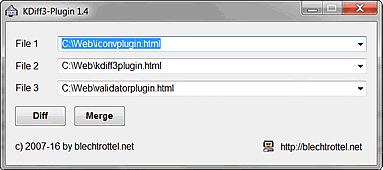
Open one or more files in phase 5 and select KDiff3 in the Tools menu. The plugin will read the filepaths and names of all the numbered tabs and open a window with up to three lists. If necessary, change the order and selection of the files and select the mode (Diff or Merge): The files are opened in KDiff3.
remarks
- KDiff3 plugin can only read out information from the tabs via the phase 5 GUI. This leads to a certain amount of flickering when tabs are changed and the Tools menu is activated.
- Our utility %1-Zwischenablage adds filepath and name of the active tab to the clipboard. You may use it for your own plugins, as long as they are freeware.
- KDiff3.exe was created using a freeware script-program named AutoIt.
- The plugin was tested under Windows XP. Suggestions, comments and criticism are welcome.
PS: freeware & viruses
All programs by blechtrottel.net are of course free of any virus. But they may be wrongly accused by some virus programs. Why this sometimes happens - to us and others - can be read on this info page.